NEW 4K Virtual Pinball Machine PC VPX RTX 4060 GPU Ryzen 5 CPU 16gb RAM ATG4k


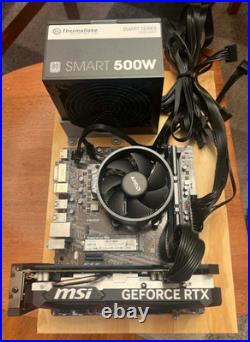
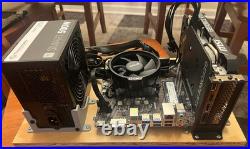






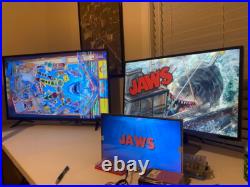


Unfortunately the higher prices of PC components right now, ive had to raise my price to keep up. Thank Ai Datacenters for increasing the cost of chips at the consumer level. This is all 100% NEW BUILD. With RAM/SSD’s going up, Ive kept my pricing as low as i can, minus no case. This is on a wood plank, for pin-cab installation, if you want it in a case. (see the last photo for the new ZALMAN case i have available). MSI Motherboard (supports a 2.1 audio setup, if you want to add SSF, you will need a usb 7.1 card). Ryzen 5 5500 6 core. 16GB TeamGroup Vulcan DDR4 RAM. MSI 4060 Video Card. Power Supply is a ThermalTake 500w. You have growing room with the CPU/GPU, and can easily upgrade video cards down the road as 5000 cards series become cheaper. This runs a a 4k 60hz playfield, and 2 additional screens, super smooth. This build is designed specifically for this setup, which you MUST have. 4k play field running 60hz. A 1080p backglass monitor. A 16:9 ratio 3rd screen for FULL DMD at 1366×768 (these 3 resolutions work perfect with a ATG 4K). (i can provide recommendations on screens if needed). NO USB MONITORS, must run though video card. Your screens need to remember the power state, so when you kill power, and apply power, they auto come on again. (all pc monitors do this, but some TV’s cant, and require a remote to power on each time). Screens must up and running before windows boots, or your screens re-arrange each time, and you have to re-configure. You have growing room even on this budget build, it runs everything currently released, near perfectly. Even On the most demanding vpin workshop tables, CPU and GPU handle all the current tables at full 60FPS. Every table will run pretty much stutter free, and never drops from 59-60FPS. (In a rare event of a lot of flashers, and ball movement, you may see slight ball stutter, Ive only seen it on the new DIE HARD). This machine can be sent to you in several different ways. BLANK, ready for you to install your own OS/Software. Clean os install, ready for you to install pinball software. You have no idea where to start, and want me to take care of everything for you, and make your life as easy as possible.. Please shoot me a message and ask for details on what I can do for you. I provide good instructions and after sales support! (please see my feedback). Ive built 30 plus pincabs, Ive been working in IT for 20+ years. I want to sell this to someone that’s putting together a virtual pinball cabinet and needs a capable computer for a good deal, and can get up and going QUICK. Please be familiar with the programs that run all this, and have some decent computer skills, its not hard, but you need to know your way around windows. I have over a dozen customers use this with ATGAMES 4K Cabinets, this worked perfectly! For ATG4k, The buttons will use “XPADDER” from what Ive read, Wagners Tech Talk covers everything Atgames4k related, so i highly recommend his youtube channel! Here’s some info on my own setup, that I run on my own machine. Latest baller installer, with VPX 10.7, beta7, latest 10.8, with the latest pinmame, b2s, and flex/ultra dmd. Im running DOF configured and working with my test setup (a sainsmart 8 relay board). Im very much on QUALITY over quantity, so I have about 300 of the latest tables. I have Colored rom support, (vni, pac, and the crz/serum, and new serum V2 format). All VPX and FP tables have had preview videos recorded for playfield, and backglass. That took me DAYS to do, this took a LOT of time getting about 700 videos recorded for pinup popper. As far as this machine goes. You need to be decent at using computers, installing games and software, basic use and understanding, this is 7 or 8 programs all working together the best they can, and you will have to make adjustments, troubleshoot, and so on, over time, as needed, when owning a vpin cabinet. The biggest part of this hobby is playing with everything and learning how it works. A backup Hard drive copy WILL BE INCLUDED. I recommend you make a full copy of the SSD drive, before you make any changes, this will save your life when you do updates and upgrades later on, if it goes sideways. I also sell plunger kits/input/nudge boards, i can discount that if bought at the same time.